

An ANALOGUE SIGNAL is one where
the waveform in the information follows the original waveform exactly at all times
A
DIGITAL SIGNAL is one where the original waveform is sampled at regular intervals and a
number given to the value of the disturbance at each of these points.
Binary
numbers are used for these sampled values.
Binary is a way of expressing numbers
in ones (high voltage value) or zeros (low voltage value) – there is nothing in between. You
can have either a 1 or a 0.
In mathematical language you are expressing numbers to the
base 2 instead of our normal decimal system where we use the base 10.
| Decimal numbers | Binary equivalent | Decimal numbers | Binary equivalent |
| 0 | 0000 | 8 | 1000 |
| 1 | 0001 | 9 | 1001 |
| 2 | 0010 | 10 | 1010 |
| 3 | 0011 | 11 | 1011 |
| 4 | 0100 | 12 | 1100 |
| 5 | 0101 | 13 | 1101 |
| 6 | 0110 | 14 | 1110 |
| 7 | 0111 | 15 | 1111 |

| Time (ms) | Signal intensity (decimal) |
Signal intensity (binary) |
Time (ms) | Signal intensity (decimal) |
Signal intensity (binary) |
|
| 0 | 78 | 01001110 | 75 | 56 | 00111000 | |
| 5 | 104 | 01101000 | 80 | 80 | 01010000 | |
| 10 | 65 | 01000001 | 85 | 62 | 00111110 | |
| 15 | 71 | 01000111 | 90 | 130 | 10000010 | |
| 20 | 80 | 01010000 | 95 | 95 | 01011111 | |
| 25 | 35 | 00100011 | 100 | 30 | 00011110 | |
| 30 | 116 | 01110100 | 105 | 61 | 00111101 | |
| 35 | 110 | 01101110 | 110 | 75 | 01001011 | |
| 40 | 46 | 00101110 | 115 | 20 | 01010100 | |
| 45 | 60 | 00111100 | 120 | 120 | 01110000 | |
| 50 | 98 | 01100010 | 125 | 115 | 01110011 | |
| 55 | 72 | 01001000 | 130 | 36 | 00100100 | |
| 60 | 60 | 00111100 | 135 | 83 | 01010011 | |
| 65 | 82 | 01010010 | 140 | 92 | 01011100 | |
| 70 | 76 | 01001100 |

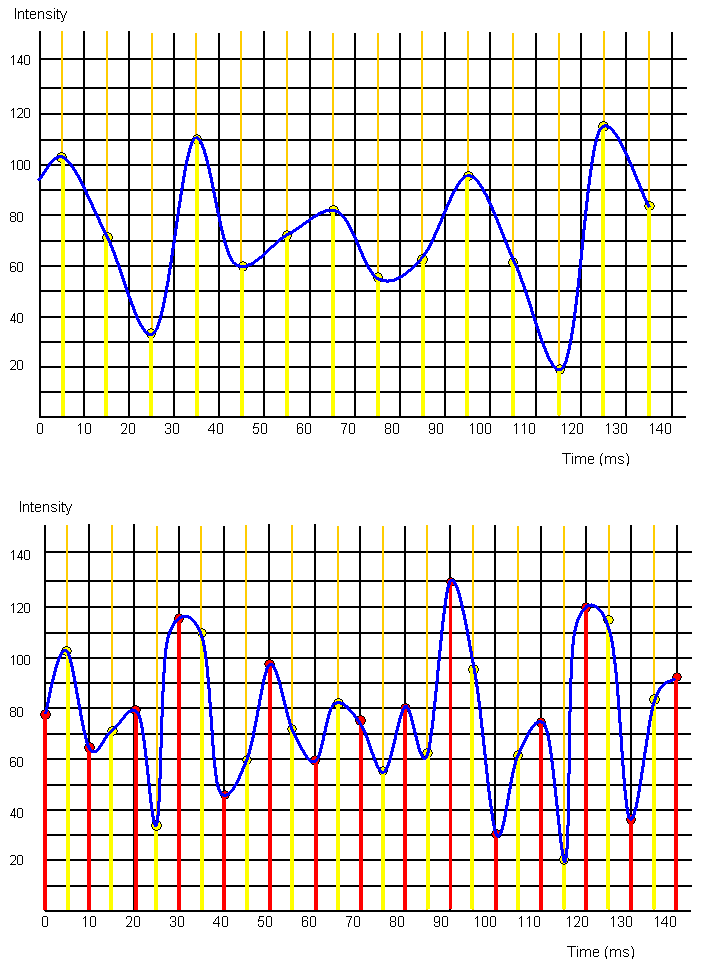
The following three graphs show the problems with sampling. If you only sample at a few times the resulting curve does not really match
the original very well. The red sampled points and the yellow sampled points give different curves from
sampling both the red and yellow points and even this does not quite fit the original wave. Therefore the more
often you sample the original wave the better the ditital output will be.
In a digital CD the original analogue waveform is sampled a staggering 44
000 times a second and for a DVD it can be double this.
The reason for using binary and not ordinary
decimal numbers is to do with interference of the original signal or
noise.